SkillStudy
An intuitive LMS that makes course creation, enrolment and progress tracking feel effortless.

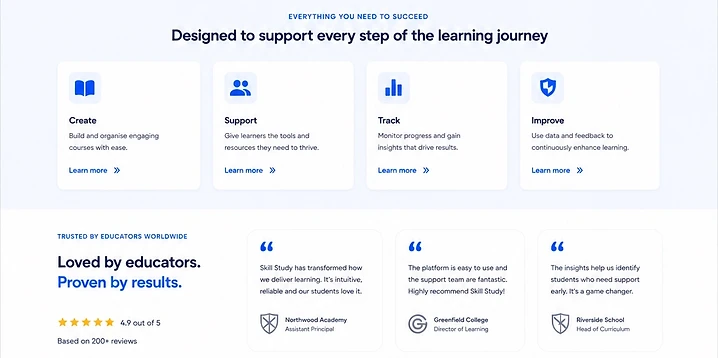
The project at a glance.
An intuitive LMS that makes course creation, enrolment and progress tracking feel effortless.
Objectives
Build a modern LMS that learners and instructors actually enjoy using.
The problem
The old platform was slow, hard to navigate and dumped content into long, unstructured lists that learners abandoned.
Target audience
Independent educators, training companies and small institutions delivering online courses.
What we built.

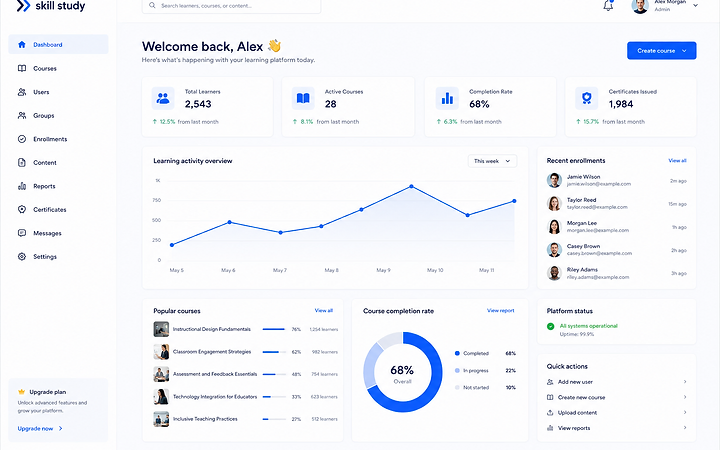
Built on React, Node.js, PostgreSQL. A modern, responsive experience designed and developed to meet the objectives above.
Live website available on request.
What the project set out to do.
Original requirements
Course builder, video lessons, quizzes, progress tracking, certificates and payments.
Design objectives
Increase course completion and reduce support load.
Brand perception
Friendly, trustworthy and modern.
User requirements
Clear progress, easy navigation, accessible video and mobile learning.
Business objectives
Sell courses, manage enrolments and grow with content.
Colour, contrast and intent.
- Colour theory
- Clean neutrals with a single blue accent for progress and achievement.
- Colour ratios
- Roughly 80% neutral surfaces, 15% ink text and 5% accent.
- Why these colours
- Learning content must stay the focus; the chrome stays quiet.
- Accent usage
- Blue marks progress, completion and the next lesson.
- Contrast
- AA throughout, with clear focus states for forms and controls.
Type that carries the structure.
- Typeface
- A readable sans for UI and long-form reading, with a display weight for course titles.
- Hierarchy
- A clear course → module → lesson structure.
- Weights
- Regular body, semibold emphasis, bold for progress numbers.
- Readability
- A comfortable measure and line height for lesson text.
- Role in the brand
- Typography structures the learning; colour rewards it.
How the experience works.
- User journey
- Browse → enrol → learn → complete → certificate.
- Navigation
- Course catalogue, learner dashboard and an instructor studio.
- Information architecture
- Catalogue → course → module → lesson, with progress always visible.
- Layout
- Video-first lesson pages with notes and clear next steps.
- Hierarchy
- Progress and 'continue' lead; settings sit second.
- Calls to action
- 'Continue learning' and 'Enrol' are the two clear actions.
- Responsive design
- Video and quizzes work fully on mobile.
- Interaction design
- Autosaving notes and one-tap bookmarking.
- Conversion
- Free preview lessons and a smooth, single-page checkout.
What it actually does.
Course builder
Drag-and-drop modules, lessons and resources.
Video lessons
Adaptive streaming with captions and playback controls.
Quizzes & assessments
Graded quizzes with instant feedback and retries.
Progress tracking
Per-learner progress, completion and certificates.
Payments & enrolment
Stripe checkout, discount codes and enrolment management.
Built to be fast and reliable.
Responsive behaviour
Lesson and dashboard layouts tested across breakpoints.
Performance
Adaptive video streaming and lazy-loaded lesson content.
Image optimisation
Thumbnails and posters served as WebP at display size.
Testing
Cross-browser, device, video and checkout testing.
Built to be found and understood.
On-page SEO
Course pages with clean metadata and structured headings.
AEO
Structured course and FAQ data so AI answer engines can summarise offerings.
Search intent
Content mapped to course discovery and 'how to learn' queries.
Usable by everyone.
Colour contrast
All text meets WCAG AA across the learner experience.
Keyboard access
Full keyboard navigation of lessons, quizzes and forms.
Captions & transcripts
Video captions and transcripts available for every lesson.
Semantic structure
Semantic landmarks and clear heading order throughout.
What it achieves.
SkillStudy makes online learning feel calm and achievable — for learners and educators alike.